Long Mode
In the last post, we created a stand-alone “Hello, world!” program, which included a 32-bit _start function in assembly. All we did in that function was print the text “Hello, world!” to the screen. Now it’s time to fill in the details of what that function really needs to do, which is the following:
- initial setup and verification
- set up a temporary stack
- verify that
eaxcontains the multiboot magic number - save the address of the multiboot info structure
- verify long mode is supported
- paging and long-mode activation
- set up 64-bit page tables
- enable the Physical-Address Extension (PAE)
- load the page tables
- enable long mode
- activate long mode by enabling paging
- preparing the 64-bit environment
- load a 64-bit Global Descriptor Table (GDT)
- enter 64-bit mode
- clear all data segment registers
- set up the permanent stack
- call the main function
Initial Setup and Verification
The Stack
First, lets set up a temporary stack; but where should we put it? The BIOS and GRUB have strewn valuable data in various locations in memory, so we don’t know what memory is free and what isn’t. So we can’t just choose some random memory location; we need to reserve some space for it. Typically, when we want to reserve some space in assembly, we use a .bss section, so that’s what we’ll do, by adding the following to the end of src/arch_x86_64/boot.asm.
section .bss
align 0x1000
STACK:
    resb 0x4000
.end:           ; stack grows down from here
We align it at a 4-KiB boundary, which will be crucial once paging is enabled, as that will be the size of each page. We reserve 16 KiB (4 pages) of memory for the stack, which should be more than enough for now. To tell the CPU to use the space we’ve reserved, we add the following to the beginning of our _start function.
    ; setup the stack
    lea esp, [STACK.end]
Multiboot Verification
Now it’s time to verify that our kernel was loaded using Multiboot. If it was, then the eax register should contain the magic number 0x36d76289. If it doesn’t then we will want to print an error and halt execution. If it does match, then we want to save off the address of the multiboot info structure (which is stored in ebx) and, for now, display some sort of success message.
So let’s replace our “Hello, world!” message from our last post with the following in the .rodata section.
SUCCESS_MSG:
    db "So far, so good!", 0
MULTIBOOT_ERR:
    db  "FATAL ERROR: Not loaded by Multiboot2 loader", 0
Now let’s reserve some space for the multiboot info address in the .bss section.
MB_INFO_ADDR:
    resd 1
And we’ll replace our old _start function with the following.
_start:
    ; setup the stack
    lea esp, [STACK.end]

    ; verify multiboot magic number
    cmp eax, 0x36d76289
    jne error.multiboot

    ; save multiboot info address
    mov [MB_INFO_ADDR], ebx

    lea edi, [SUCCESS_MSG]
    jmp print_and_halt
.end:
Of course, now we need to define error.multiboot and print_and_halt, which we use in our new _start function:
error:
.multiboot:
    lea edi, [MULTIBOOT_ERR]
    jmp print_and_halt
.end:

print_and_halt:
    lea edx, [0xb8000]      ; video memory base address
    mov ecx, 0              ; byte offset
    mov ah, 0x0f            ; color - white on black
.loop:
    mov al, [edi+ecx]       ; read the next character
    cmp al, 0               ; if it's null
    jz .halt                ; break
    mov [edx+ecx*2], ax     ; write the character (with the color) to the screen
    inc ecx                 ; increment the byte offset
    jmp .loop
.halt:
    hlt
    jmp .halt
.end:
Note that the print_and_halt function looks almost identical to our old “Hello, world!” _start function, except that the message is passed to it through the edi register. Normally we would transfer control to a function using the call instruction, and we would need to save and restore registers. However, since these functions never return, that isn’t necessary and we can just use jumps.
Verify Long Mode Support
We can verify if the CPU supports long mode using the cpuid instruction. However, first we need to verify that cpuid instruction is itself supported. We do this by checking if bit 21 of the eflags register can be altered. But we can’t alter it directly. The only way to access the eflags register is through pushing it onto the stack and popping it off of the stack. Below is my code to verify cpuid support.
    ; verify cpuid instruction is supported
    pushfd                      ; push eflags to the stack
    mov eax, [esp]              ; store the original eflags
    xor dword [esp], 1 << 21    ; invert ID flag (bit 21)
    popfd                       ; load new eflags
    pushfd                      ; push new eflags to see if it changed
    xor eax, [esp]              ; get changes in eflags
    test eax, 1 << 21           ; test if the ID flag was successfully changed
    jz error.cpuid
Note that we will need to add a new error and the label error.cpuid. We’ll do that in a moment, but first, let’s complete our long-mode verification.
The cpuid has multiple functions. Which function is executed depends on a parameter in the eax register. The function to check for long mode support (and several other flags) is 0x80000001. After calling this cpuid function, long mode will be indicated by bit 29 (the LM flag) of the edx register. However, we first have to check for support of that function using the function 0x80000000, which will return the highest function number supported in eax. Here is the code.
    ; verify long mode is supported
    mov eax, 0x80000000         ; check for highest available extended function
    cpuid
    cmp eax, 0x80000001         ; make sure extended feature flags funtion is available
    jb error.long_mode
    mov eax, 0x80000001         ; check extended feature flags
    cpuid
    test edx, 1 << 29           ; test if the LM flag (bit 29) is set
    jz error.long_mode
Now our list of messages looks like this:
SUCCESS_MSG:
    db "So far, so good!", 0
MULTIBOOT_ERR:
    db "FATAL ERROR: Not loaded by Multiboot2 loader", 0
CPUID_ERR:
    db "FATAL ERROR: CPUID instruction not supported", 0
LONG_MODE_ERR:
    db "FATAL ERROR: Long mode not supported", 0
And error looks like this:
error:
.multiboot:
    lea edi, [MULTIBOOT_ERR]
    jmp print_and_halt
.cpuid:
    lea edi, [CPUID_ERR]
    jmp print_and_halt
.long_mode:
    lea edi, [LONG_MODE_ERR]
    jmp print_and_halt
.end:
Paging and Long-Mode Activation
The x86-64 architecture requires us to set up paging in order to enter long mode. First, we need to discuss how paging works, both some general concepts and some of the specifics of paging on the x86-64 architecture.
Physical and Virtual Addresses
If you have 16 GiB of RAM, each byte of that RAM has a physical address ranging from 0x0000_0000_0000_0000 to 0x0000_0003_ffff_ffff. Addresses from 0x0000_0004_0000_0000 and above would be inaccessible (unless reserved for memory-mapped I/O).
With paging, we could (as an example) map a virtual address of 0xffff_ffff_ffff_f000 to point to the physical address 0x0000_0000_0000_1000. We could also, map the virtual address 0x0000_0000_0000_1000 to point to 0x0000_0000_0000_1000. That is, two virtual addresses can point to the same physical address. The virtual address can also be the same as the physical address, or it can be different. When the virtual address is the same as the physical address, that is called identity mapping.
Pages and Frames
A frame refers to a region of physical memory with a specific size (often 4KiB), with the alignment the same as the size. A page, on the other hand is a region of the same size and alignment in virtual memory. A page may be present, or not. Each page in virtual memory which is present maps to an equal-sized frame in physical memory. A page frame is the frame that a specific page maps to. A page which is not present is not (currently) mapped to any location in physical memory. An attempt to access a virtual address within a page which is not present will result in a page fault, which we will talk about more in a later post.
The Virtual Address Space
Virtual addresses on the x86-64 have 48 significant bits. The most significant bit is sign-extended up to 64-bits. Some people treat virtual addresses as unsigned. In this view there are two separate blocks of usable addresses, one from 0x0000_0000_0000_0000 through 0x0000_7fff_ffff_ffff and the other from 0xffff_8000_0000_0000 through 0xffff_ffff_ffff_ffff, with an unusable memory hole from 0x0000_8000_0000_0000 through 0xffff_7fff_ffff_ffff. Since the addresses are sign-extended, it seems more natural to me to treat virtual addresses as signed. In this view, there is one single continuous block of usable virtual memory space from 0xffff_8000_0000_0000 (at the -256 TiB mark) through 0x0000_7fff_ffff_ffff (1 byte below the 256 TiB mark).
Page Tables
Translation from a virtual address to a physical address on the x86-64 makes use of four tables: the Page Map Level 4 (PML4), the Page Directory Pointer Table (PDPT), the Page Directory (PD), and the Page Table (PT). Those are the names and acronyms used in the official documentation, but I think these names and acronyms are confusing and not very meaningful. As such, I will refer to them, respectively, as the level 4 (L4), level 3 (L3), level 2 (L2), and Level 1 (L1) tables, which is far more self-explanatory.
For each 4-KiB page that is mapped, an L4 table entry points to an L3 table; an L3 table entry points to an L2 table; an L2 table entry points to an L1 table; and finally, an L1 table entry points to a 4 KiB frame of physical memory, as shown in the image below.
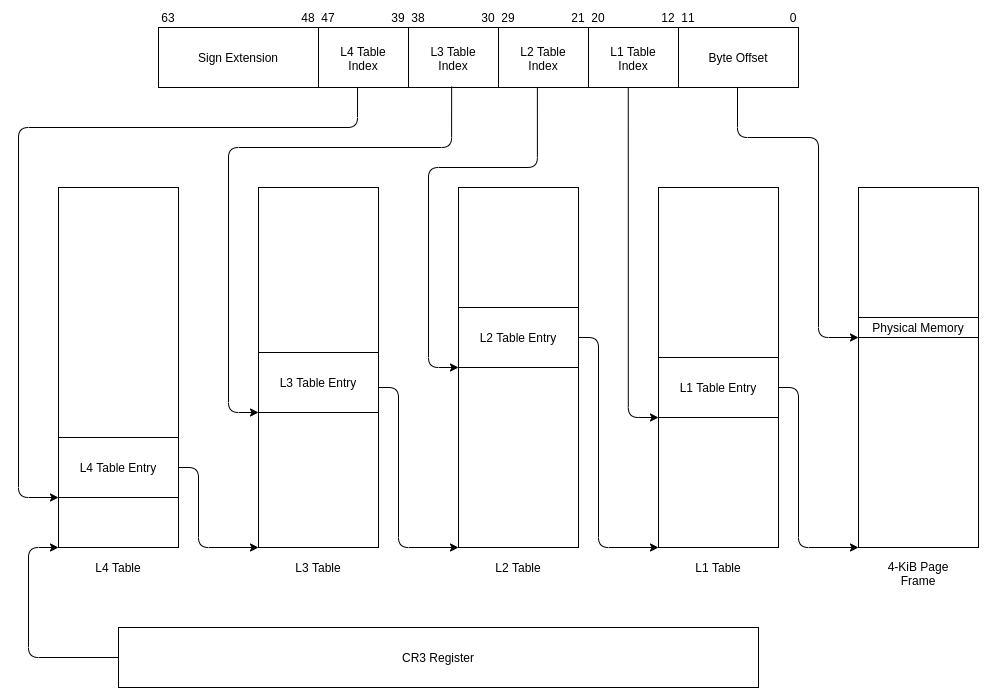
Alternatively, entries in the L2 table can point directly to large 2-MiB pages. Likewise, L3 table entries can potentially point to even larger 1-GiB pages. While these larger page sizes are generally impractical for most purposes, they a nice for mapping out large contiguous memory spaces that should always be present. We will actually make use of large 2-MiB pages to identity map a portion of the kernel’s address space, and in a later post, to create a contiguous map of the entire physical address space.
Page Table Entries
On the x86-64, each page table is composed of 512 64-bit entries and takes up one 4-KiB frame. Each entry stores a 52-bit address of a physical frame, as well as various 1-bit flags. As these frames are at least 4-KiB in size, they also must be aligned on at least a 4-KiB boundary, which means that the 12 least-significant bits of the address will always be zero. As such, the CPU uses some of the 12 least-significant bits of the table entry for flags, and makes others available to the operating system.
The entry is divided up as follows:
- Bits 0-8: Various flags used by the CPU.
- Bits 9-11: Available for use by the operating system.
- Bits 12-51: Correspond to bits 12-51 of the address of a physical frame.
- Bits 52-62: Available for use by the operating system.
- Bit 63: Another flag used by the CPU.
For now, we will only concern ourselves with the following flags:
-
The Present flag (bit 0). If set, then the entry points to the physical address of a page or another table. If the Present bit is clear, then the remainder of the bits lose their meaning and become available to the operating system. For now, we’ll just clear entries that are not present to zero.
-
The Read/Write flag (bit 1). If set, then there are no write restrictions as a result of this entry. However, if it is cleared, then every page mapped using this entry, all the way down the tree, is read-only.
-
The Page Size flag (bit 7). If set, in an L2 or L3 table, then, rather than pointing to another page table, they point to a large 2-MiB or 1-GiB page frame (which must be aligned accordingly). This flag is not valid for L4 or L1 tables, and in fact, bit 7 has a different meaning in L1 tables.
Setting Up the Page Tables
Before launching our Rust code, we will need to set up page tables for two regions. The first, is the kernel’s code and data. When we turn on paging, the next instruction needs to be identity mapped so we don’t pull the rug out from under our running code. We’re not sure how much memory will need to be identity mapped, but, with our kernel loaded at the 1-MiB mark, we’ll just map the first 16 MiB. We will use large 2-MiB pages for this.
The next region is the stack. Currently, our stack has 16 KiB of memory within the area that is identity mapped. However, we want the stack to have room to grow, so we’ll re-map the stack into the 16 MiB just below zero in the virtual address space (or from the unsigned perspective, the 16 MiB at the very top of the address space). With our stack in the negative address space growing downwards, and our code and heap in positive address space, growing upwards, we guarantee that the two will never clash. We will use the normal 4-KiB pages for our stack.
So, we will need an L2 and an L3 table for our identity mapped kernel, an L1, an L2, and an L3 table for the stack, and a single L4 table at the top of everything. They will be mapped as follows:
PTF_PRESENT     equ  1 << 0
PTF_WRITABLE    equ  1 << 1
PTF_LARGE_PAGE  equ  1 << 7

section .data
align 0x1000
L2_TABLE_ID_MAP: ; identity map the first 16 MiB just above zero
    dq 0x000000 | PTF_PRESENT | PTF_WRITABLE | PTF_LARGE_PAGE
    dq 0x200000 | PTF_PRESENT | PTF_WRITABLE | PTF_LARGE_PAGE
    dq 0x400000 | PTF_PRESENT | PTF_WRITABLE | PTF_LARGE_PAGE
    dq 0x600000 | PTF_PRESENT | PTF_WRITABLE | PTF_LARGE_PAGE
    dq 0x800000 | PTF_PRESENT | PTF_WRITABLE | PTF_LARGE_PAGE
    dq 0xa00000 | PTF_PRESENT | PTF_WRITABLE | PTF_LARGE_PAGE
    dq 0xc00000 | PTF_PRESENT | PTF_WRITABLE | PTF_LARGE_PAGE
    dq 0xe00000 | PTF_PRESENT | PTF_WRITABLE | PTF_LARGE_PAGE
    times 504 dq 0

align 0x1000
L3_TABLE_ID_MAP:
    dq L2_TABLE_ID_MAP + PTF_PRESENT + PTF_WRITABLE
    times 511 dq 0

align 0x1000
L1_TABLE_STACK: ; map the 16 KiB just below 0
    times 508 dq 0
    dq STACK + 0x0000  + PTF_PRESENT + PTF_WRITABLE
    dq STACK + 0x1000  + PTF_PRESENT + PTF_WRITABLE
    dq STACK + 0x2000  + PTF_PRESENT + PTF_WRITABLE
    dq STACK + 0x3000  + PTF_PRESENT + PTF_WRITABLE

align 0x1000
L2_TABLE_STACK:
    times 511 dq 0
    dq L1_TABLE_STACK  + PTF_PRESENT + PTF_WRITABLE

align 0x1000
L3_TABLE_STACK:
    times 511 dq 0
    dq L2_TABLE_STACK  + PTF_PRESENT + PTF_WRITABLE

align 0x1000
L4_TABLE:
    dq L3_TABLE_ID_MAP + PTF_PRESENT + PTF_WRITABLE
    times 510 dq 0
    dq L3_TABLE_STACK  + PTF_PRESENT + PTF_WRITABLE
To load the tables, first we need to enable the Physical-Address Extensions (PAE), which will allow 52-bit physical addresses. We do this by setting bit 5 of the cr4 register. We can then load the address of the L4 table into cr3 as shown below.
    ; set the PAE bit in cr4
    mov eax, cr4
    or eax, 1 << 5
    mov cr4, eax

    ; load page tables
    lea eax, [L4_TABLE]
    mov cr3, eax
Long Mode
The page tables are now all set up, and the address of the L4 table is loaded into the cr3 register. However, we have yet to actually turn paging on. Turning on paging is actually the final step in activating long mode. We first enable long mode by setting the Long Mode Enable (LME) bit (bit 8) of the Extended Feature Enable Register (EFER). After that, enabling paging will automatically set the Long Mode Active (LMA) bit (bit 10) of the EFER. These steps are done with the following code.
    ; enable long mode
    mov ecx, 0xC0000080
    rdmsr
    or eax, 1 << 8
    wrmsr

    ; enable paging
    mov eax, cr0
    or eax, 1 << 31
    mov cr0, eax
Preparing the 64-bit Environment
The Global Descriptor Table
After this code executes, long mode is technically active, but we’re running in 32-bit compatibility mode. To enter full 64-bit long mode, we must execute a long jump into 64-bit code. A long jump, means specifying the memory segment. Long mode technically requires a flat non-segmented memory model, but we still have to set up one code segment in the Global Descriptor Table (GDT) for this flat memory layout. Most of the fields in this table are ignored in 64-bit long mode, but we have a few that apply to 64-bit code segments.
- The Long Attribute Bit (bit 53). When set, this indicates that the processor is running in full 64-bit long mode, instead of 32-bit compatibility mode.
- The Present Bit (bit 47). When set, the entry in the GDT is present. If cleared, it is not and cannot be used for the code segment selector.
- The Descriptor Privilege-Level (DPL) Field (bits 45-46). This can be set to a value from 0 to 3, with 0 being the most priviledged and 3 being the least. For now, we will only use priviledge level 0. Once we’re able to run user software, it will run at priviledge level 3.
- The S Bit and the Code/Data bit (bits 44 and 43). While the documentation says that these bits are ignored in 64-bit mode, they both need to be set to 1, to indicate that this is a code segment at least when we make the switch from 32-bit mode to 64-bit mode.
- The Conforming Bit (bit 42). When set, it allows code to run using this descriptor at a less privilidged level than indicated by the DPL field.
We need to set up a descriptor table with both a zero entry and a code segment. The code segment will have the Code/Data Bit (bit 43), the S Bit (bit 44), the Present Bit (bit 47) and the Long Attribute Bit (bit 53) set. All other bits will be cleared. We put the following in the .rodata section.
GDT_PRESENT     equ 1 << 47
GDT_CODE_SEG    equ (1 << 43) | (1 << 44)
GDT_LONG_ATTR   equ 1 << 53

align 16
GDT64:
.zero:
    dq 0
.code: equ $ - GDT64
    dq GDT_PRESENT | GDT_CODE_SEG | GDT_LONG_ATTR
.pointer:
    dw $ - GDT64 - 1
    dq GDT64
.end:
The portion between the GDT64 label and the .pointer label is the table. To load the table, we need a specially formatted pointer to it, as seen above under the .pointer label. That pointer is composed of a 16-bit limit (the size in bytes minus 1) followed by a 64-bit virtual address, which is the same as the physical address since it’s identity mapped. Then we add the following code to load the GDT into the GDT register (GDTR).
    ; load the 64-bit GDT
    lgdt [GDT64.pointer]
Now we can finally execute a long jump into some 64-bit code. We can replace the printing of SUCCESS_MSG with the following to end the 32-bit _start function and jump to a new 64-bit function called long_mode_start.
    ; jump to enter long mode
    jmp GDT64.code:long_mode_start
GDT.code is the offset into the GDT of the code segment descriptor we want to use, and long_mode_start is, of course, the address we want to jump to.
Now, before we can build and run this code, we need to write some 64-bit code.
64-Bit Code
The sole purpose of the long_mode_start function is to prepare for and call a main function written in Rust. All we need to do is clear the data segment registers, set the stack to the new location, and call main.
[bits 64]
section .text
long_mode_start:
    ; load 0 into all data segment registers
    mov ax, 0
    mov ss, ax
    mov ds, ax
    mov es, ax
    mov fs, ax
    mov gs, ax

    ; set stack to grow down from 0
    mov rsp, 0

    call main
.halt:
    hlt
    jmp .halt
.end:
Now we add our main function to src/main.rs. We use the #[no_mangle] attribute to ensure that Rust leaves the symbol as main, instead of modifying it as it generally does. We add extern "C" to tell rust to use the C ABI. For the body of the function, we just print “Welcome to Myros!” to the screen as cyan text.
const CYAN: u8 = 0xb;
struct ColoredChar(u8, u8);

#[no_mangle]
extern "C" fn main() {
    let s = b"Welcome to Myros!";
    let video_mem = 0xb8000 as *mut ColoredChar;

    for (i, &c) in s.iter().enumerate() {
        unsafe {
            write_volatile(video_mem.add(i), ColoredChar(c, CYAN));
        }
    }
}
Note that even though we now have a function called main, we still need to keep the #![no_main] attribute that we added to main.rs in the last post. What #![no_main] really means is that Rust does not provide any startup code to call the main function. Also, there’s no reason why this function has to be called main. We could call it whatever we want. I simply called it main because it serves the same purpose as a typical main function, whereas our assembly code serves a similar purpose to Rust’s builtin startup routines.
Next: 3. Printing to the Screen »»»